One place for the habits you’re building together
Children do better when they can see their progress. Parents do better when they aren’t keeping score in their heads. Sitaray does the counting for both of you.
For parents
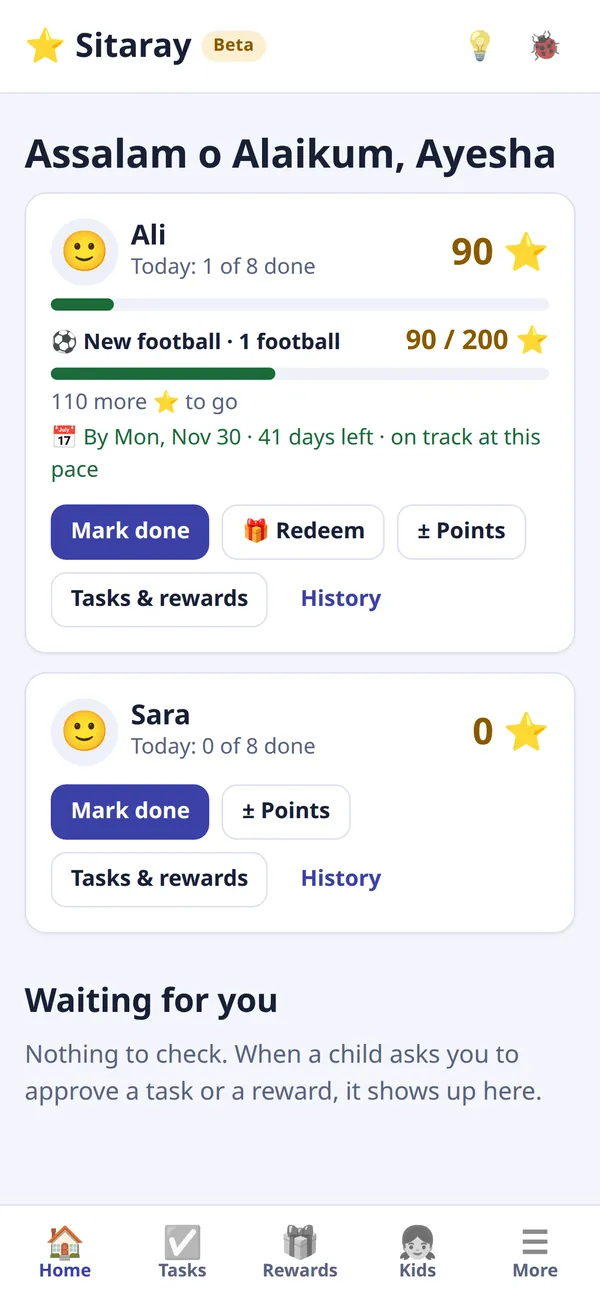
Set tasks and rewards once and decide what each one is worth. Approve with a tap from your phone, and invite the other parent so you both see the same thing.
For children
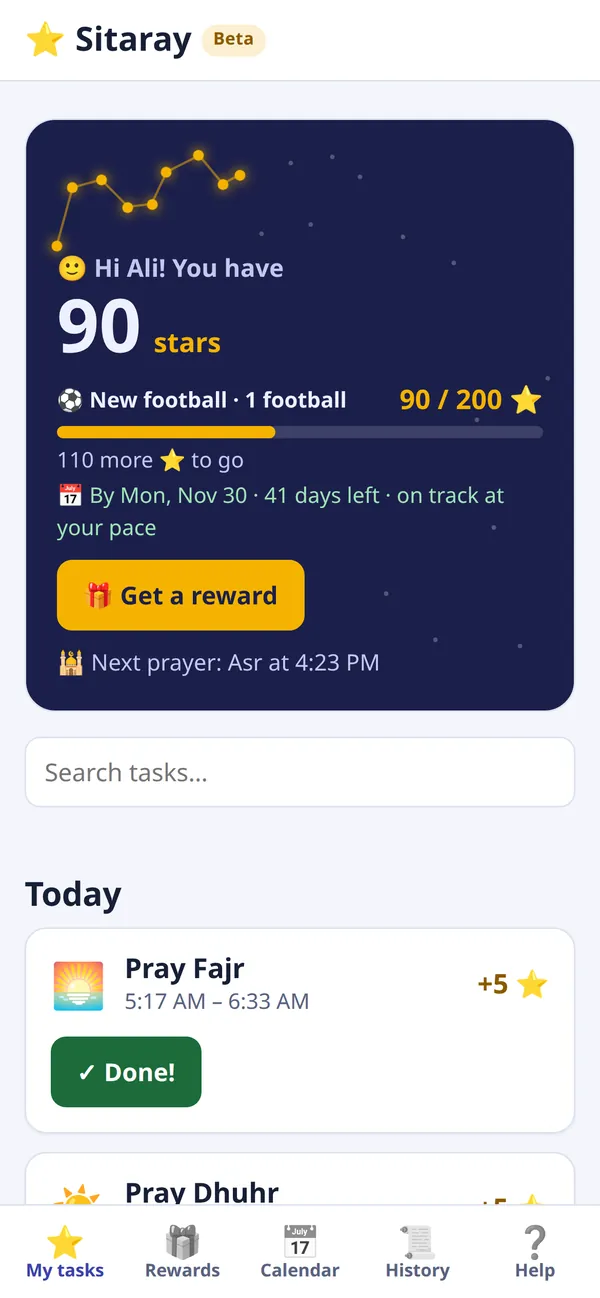
Their own night sky fills with stars as they earn them. They can see what’s left to do today, choose a reward, and watch a constellation complete as they save for something big.
For Muslim families
Salah times for your city, with each prayer as a task that opens at its time. Add the sunnah prayers in one tap, and reminders on your child’s device when it’s time to pray.
What your family sees
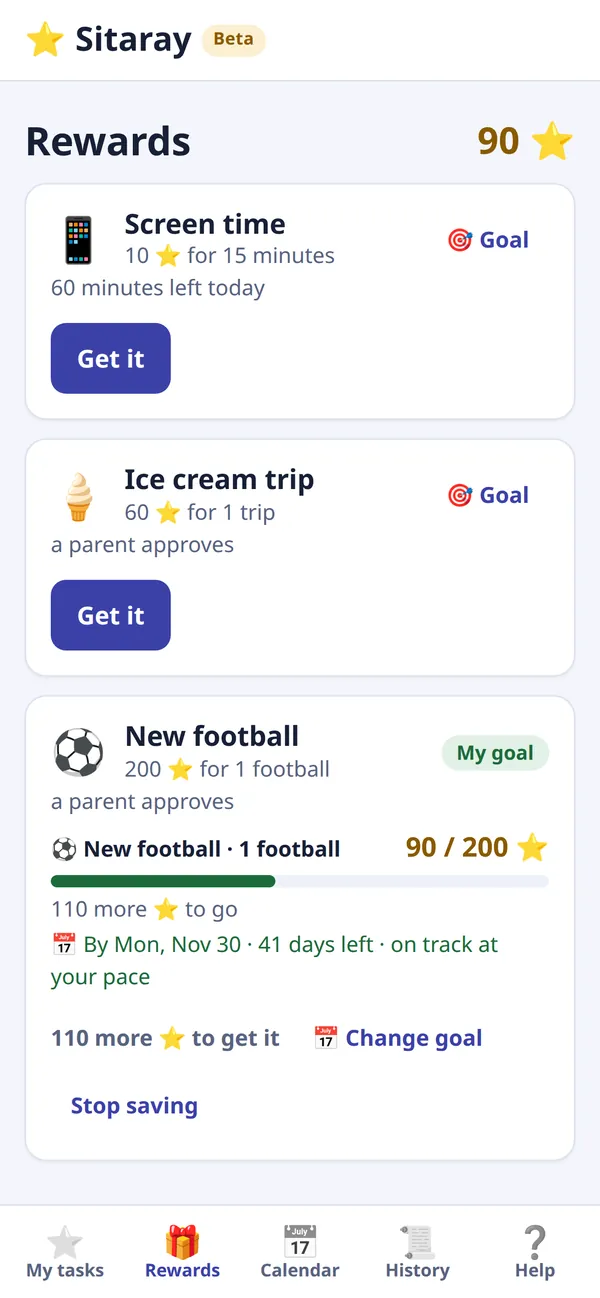
Screens from Sitaray on a phone, with a sample family: Ali is saving for a football, and his mum Ayesha checks in from her own phone.
Ready in ten minutes
A short walkthrough helps you set up the first time. You can change everything later.
Add your children
Give each child a name, a picture and a PIN. Invite the other parent with a link you can send on WhatsApp.
Choose tasks and rewards
Pick from the library, or write your own. Decide how often, how many stars, and whether a parent checks it.
Earn, save and spend
Children mark tasks done and spend stars on rewards: screen time, a trip to the park, a treat. You give the reward.
Made for real family routines
Every family runs differently, and every child is different. Sitaray bends to fit.
- Tasks that repeat the way life does
- Daily, weekly, monthly or once. “Exercise 3 times a week” or “brush teeth twice a day” pays out when it’s done enough times.
- Fair for each child
- One task can be worth 10 stars to an older child and 8 to a younger one. Rewards can have their own price for each child, too.
- You decide who checks
- Only a parent marks it, the child asks and you approve, or the honor system. Choose for each task.
- Savings goals and saving together
- A child can save up for a bigger reward. Brothers and sisters can pool their stars for something the whole family shares.
- A family assistant
- Ask for ideas that suit your child’s age, or how to make a task stick. It can set things up for you, and check in each week. It uses Claude, an AI by Anthropic.
- Notifications
- Know when a child asks for approval or buys a reward. Children get a reminder at prayer times.
- A library of ideas
- Ready-made tasks and rewards by category, from chores and reading to Quran and kindness, so you never start from a blank page.
- Quick, safe log-in
- Parents can use Face ID or a fingerprint, or continue with Google. Children use a PIN on a shared tablet or their own device.
Built for children, private by design
Your family’s routines are your business. Read the full privacy policy.
- No ads, and we never sell your data.
- Children never give us an email address, phone number, photo or location.
- Nothing is measured on children’s screens. We count visits to parents’ screens only.
- You can ask for a copy of your family’s data, or for it to be deleted.
Free while we’re in beta
Sitaray is new, and we’re building it with the families who use it. During the beta every feature is free, for as many children as you have.
If we introduce paid features later, we’ll tell you in advance, and nothing will be charged without your clear agreement. See the terms.
Everything in Sitaray, for your whole family.
- As many children as you have
- Both parents, on any device
- Prayer times and savings goals
- The family assistant
- Notifications and Face ID log-in
From the blog
Practical ideas for building habits at home.
Teaching children to pray five times a day
A practical, gentle plan for helping children build the habit of salah, step by step, from the first prayer to all five on time.
Pocket money or a reward chart: which is better?
The difference between pocket money and a reward chart, what each teaches children, and how many families use both.
Screen time rules for kids that work
Clear, calm screen time rules that end the daily argument, and how to use screen time as a reward without it taking over.
Questions parents ask
Is Sitaray really free?
Yes. Sitaray is in beta, and everything is free. If we add paid features later, we’ll tell you first, and you’ll never be charged without agreeing to it.
Does my child need a phone or an email address?
No. Children log in with your family code and their own PIN, on any device: a shared tablet, a parent’s phone, or the family computer.
Is there an app to download?
Sitaray works in the browser. On a phone you can add it to your home screen, and it opens like an app, with notifications. It works on Android, iPhone and computers.
Can both parents use it?
Yes. Invite the other parent with a link from Settings. You’ll both see the same children, tasks and requests, and either of you can approve.
Does Sitaray handle money?
No. Stars are points inside your family and have no money value. If a reward is pocket money, you give it yourself, outside Sitaray.
What does the family assistant see?
To answer, it is sent your family’s details in Sitaray: children’s first names and ages, tasks, rewards and progress. It uses Claude, an AI by Anthropic. It’s optional, and the privacy policy explains what is shared.
Is Sitaray only for Muslim families?
No. Prayer times are something you turn on if you want them. Any family can use Sitaray as a chore chart and reward chart, with tasks and rewards that fit your home.
What age is Sitaray for?
Families usually start when children are old enough to understand “do this, earn that”. Younger children can use it with a parent’s help; older children often like running their own savings goals.
Contact us
Questions, ideas or something not working? Write to us. A real person reads every email.
hello@sitaray.appAlready using Sitaray? Parents can also use Report a bug or Suggest an improvement at the top of the app.
Follow us on Instagram at @sitaray.app for tips and ideas for your family.
- Help with your familyAsk us anything about setting up, tasks or rewards.
- Schools and parent groupsWant to try Sitaray with a class or a group of parents? Tell us about it.
- Privacy and your dataAsk for a copy of your data, or for it to be deleted, at hello@sitaray.app.